

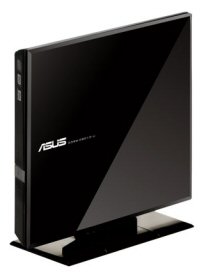

Model: ASUS SDRW-08D1S-U 8x USB 2.0 DVD±RW/RAM
Manufacturer: ASUSTeK Computer, Inc
ASUSTeK Computer is no stranger to the computer industry. A favorite among computer enthusiasts, this Taiwanese company is recognized as one of the world's leading manufacturers of computer components. While best known for their motherboards, graphics cards and notebook computers, ASUS has shown us that they're pretty serious about optical storage. Over the years, they've introduced a wide range of products for the portable and desktop markets. With their innovative technologies and impressive performance, these drives have been popular right from the start.
 With the growing popularity of ultraportable notebooks and netbooks, the portable optical drive market has experienced something of a renaissance. To keep these computers small and lightweight, manufacturers have opted not to include a built-in optical drive. As a result, netbook owners have looked to external DVD writers to backup their data and play movies. In response, ASUS has introduced its own external slim DVD writer, the SDRW-08D1S-U. This stylish and compact drive is capable of 8x DVD±R, 8x DVD+RW, 6x DVD-RW, 6x DVD±R DL and 5x DVD-RAM writing speeds and a maximum DVD read speed of 8x. A truly portable solution, the SDRW-08D1S-U is also USB powered, eliminating the need for an AC adapter.
Needless to say, this is only a taste of what the SDRW-08D1S-U has to offer. To give you an idea of what to expect from ASUS's new DVD writer, we'll take a look at some of the drive's features and then put it through its paces to see how it performs. Is the SDRW-08D1S-U the best choice for the person on the go? Read on as we find out.


